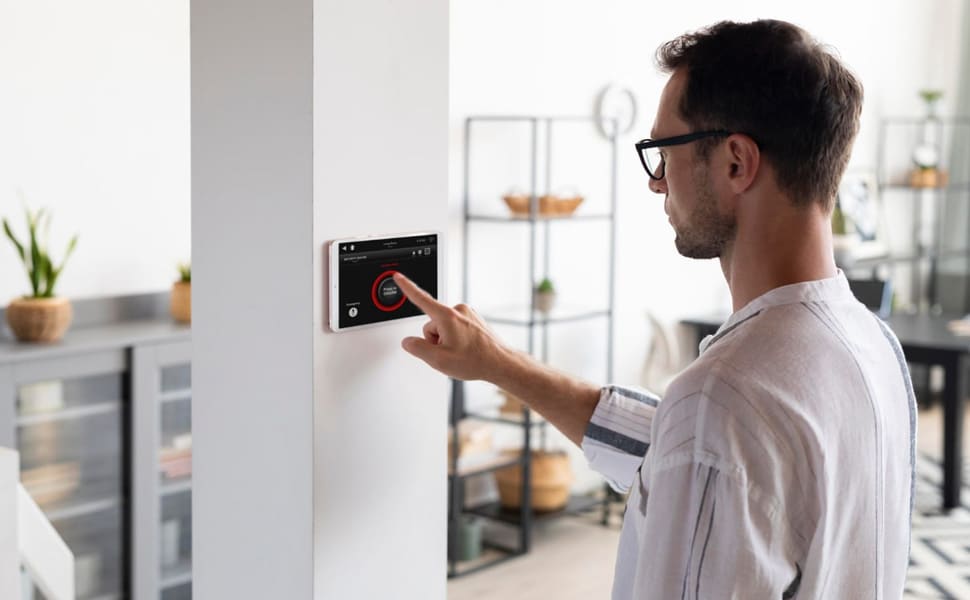
A thermostat for infrared heater control switches your heating on when you need warmth. It measures the room temperature, turns the heater on and off as needed, and maintains your chosen setting. The right type depends on how your heater connects, its power rating and how you want to control it.
This guide compares the main types, explains where to position a thermostat in the room, and sets out the controls required for Opranic P5, P6 Hybrid and P7.
Which thermostat is right for your infrared heater?
Every thermostat measures temperature and switches the heater on or off. The main differences are how they connect, how you control them and which additional functions they offer.
| Type | Connection | Suitable when |
|---|---|---|
| Plug-in thermostat | Between the socket and the heater’s plug | You want to control a plug-in heater without installation. |
| Wireless thermostat | Receiver at the heater; controller with temperature sensor positioned elsewhere in the room | The best place to measure room temperature is away from the heater’s socket. |
| Fixed room thermostat | Recessed or surface-mounted, with a fixed connection to the power supply | The heater is hardwired. A qualified electrician must carry out the installation. |
| Smart thermostat with app | Connects to your smartphone via Wi-Fi or a wireless hub | You want to change schedules in an app or control the heater when you are away. |
A plug-in thermostat is the simplest option for a heater with a plug. A wireless thermostat lets you place the temperature sensor away from an inconvenient socket, such as one directly beneath the heater or behind a sofa. A fixed room thermostat gives a permanently mounted heater a connection without a visible cable. A smart thermostat is worth considering if your daily routine changes often or you want to control several rooms centrally.
How a thermostat works
You set your preferred temperature. If the measured room temperature falls below it, the thermostat switches the heater on. Once the room reaches that temperature, it switches the heater off. The infrared heater therefore runs in cycles, either at full power or not at all. The better the room retains heat, the longer it stays off between cycles.
Switching capacity: matching a thermostat to your infrared heater
Check the switching capacity, whichever type of thermostat you choose. A thermostat for an infrared heater must be rated for the electrical load of the heater it controls. You can find the maximum load on the thermostat’s rating plate or in its instructions, usually in amperes (A) or watts (W). At 230 V, divide the power in watts by 230 to calculate the current in amperes.
| Heater power | Current at 230 V |
|---|---|
| 300 W | Approx. 1.3 A |
| 600 W | Approx. 2.6 A |
| 900 W | Approx. 3.9 A |
| 2 × 900 W = 1,800 W | Approx. 7.8 A |
Room thermostats are commonly rated at 10 A (2,300 W) or 16 A (3,680 W). Check the rating plate for the limit that applies to yours. If one thermostat controls several heaters, add their power ratings together. Choose a thermostat with capacity to spare.
Thermostat features worth considering
A thermostat for an infrared heater can do more than switch it on and off. Four features are particularly useful in everyday use.
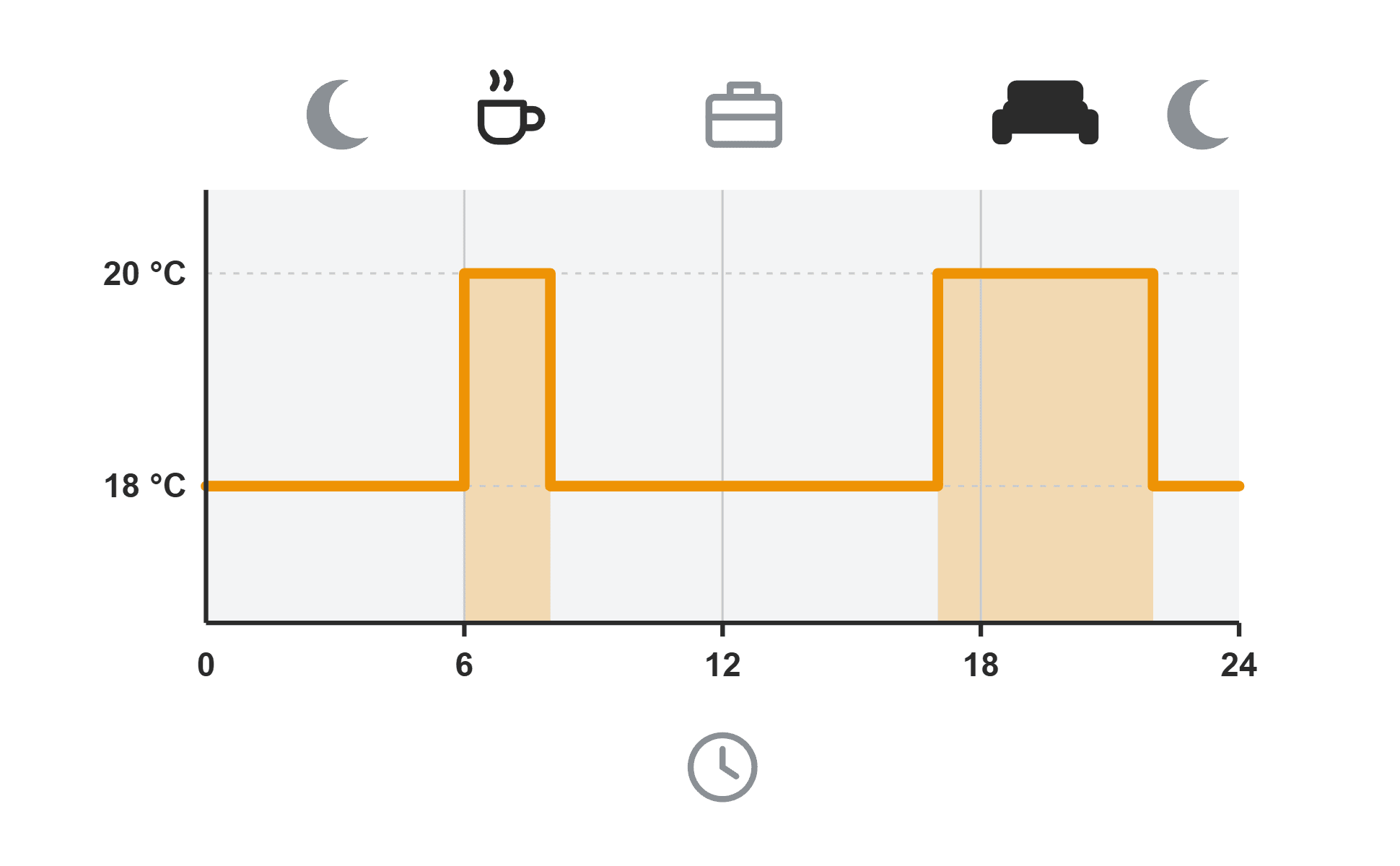
- Weekly schedule: Set the temperature for different times on each day of the week.
- Open-window detection: If the temperature drops suddenly while you ventilate the room, the heater pauses.
- Setback temperature: The thermostat maintains a lower temperature overnight or while you are away.
- App and smart home control: Adjust schedules on your phone and connect the thermostat to other devices.
Opranic also recommends a weekly schedule and open-window detection when selecting a thermostat for the P5 or P7.
What temperature should you set?
The German Federal Environment Agency recommends no more than 20 °C in living areas, 18 °C in the kitchen and 17 °C in the bedroom. For overnight use or when you are away for several hours, it recommends lowering the temperature to about 18 °C. You can choose the settings you find comfortable. A weekly schedule then maintains them without daily adjustments.
Where to position a thermostat for your infrared heater
Even the best thermostat for an infrared heater can only respond to the temperature its sensor measures. The room sensor should measure the temperature where you spend time. If it sits in the heater’s direct radiant heat, in sunlight or in a draught, its reading will be misleading. The heater may then switch on or off too early or too late.
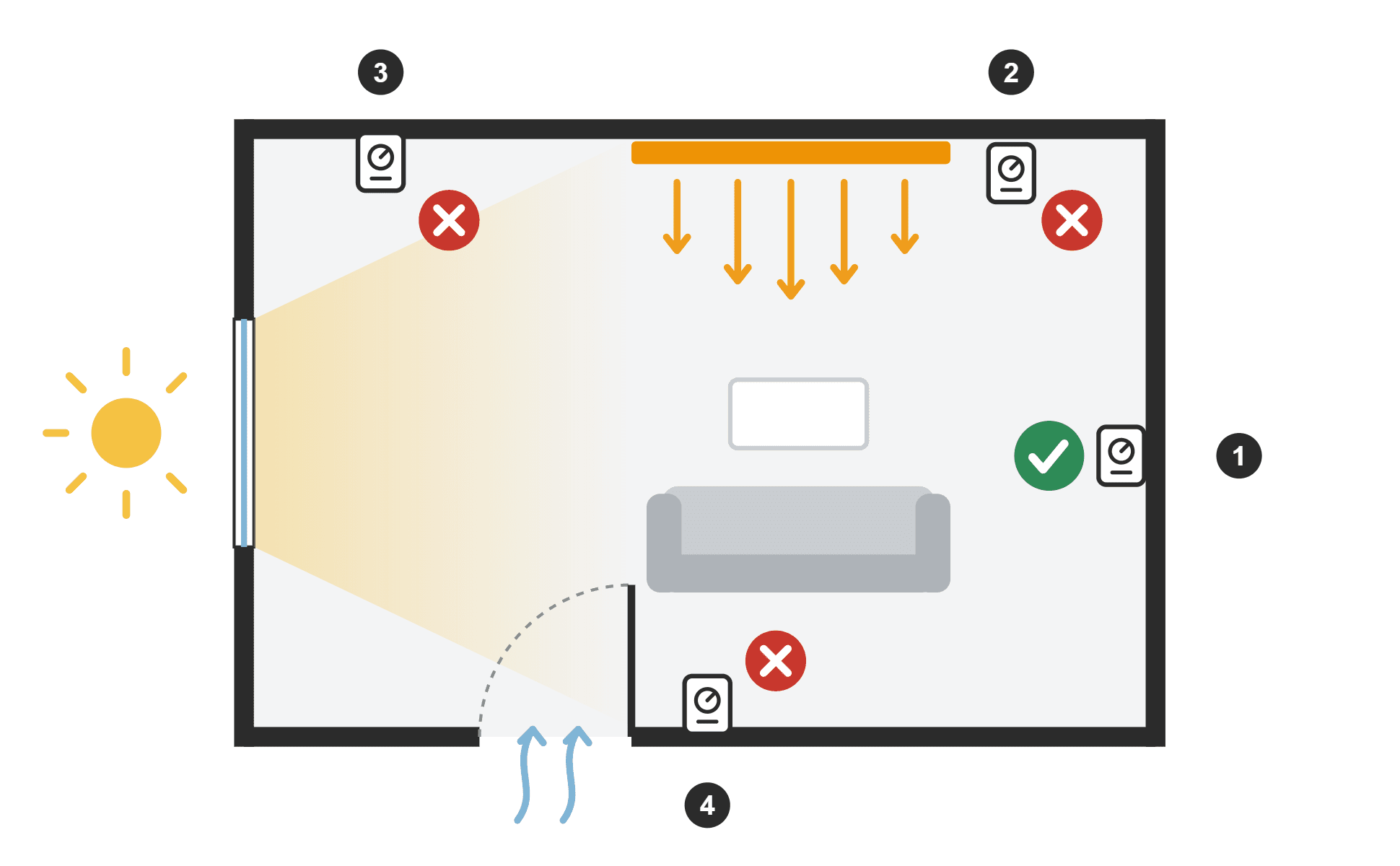
- Place it on an internal wall in the part of the room you use.
- Keep it away from the heater and out of its direct radiant heat.
- Avoid direct sunlight, draughts from doors and windows, and other heat sources.
- Do not conceal it behind curtains or furniture.
Follow the thermostat manufacturer’s instructions for mounting height. A plug-in thermostat has its sensor inside the unit. If the socket is close to the heater or behind furniture, a wireless thermostat with a sensor you can position separately is a better choice.
Bathrooms have additional electrical installation requirements. The thermostat and socket must be approved for the area where they will be installed. A wireless thermostat with its control unit outside the wet zone is often a practical solution. Have a qualified electrician check the bathroom installation.
For guidance on where to mount the heater itself, see our guide to heater spacing and placement.
Setting up a plug-in thermostat: step by step
- Check the power rating: Make sure the heater’s power does not exceed the thermostat’s rated load.
- Plug it in: Plug the thermostat into a wall socket, then plug the heater into the thermostat. Avoid extension leads and multi-socket adaptors.
- Switch on the heater: If the heater has its own switch or control, leave it on. On the P6 Hybrid, the rotary control will still limit the temperature of the heating surface.
- Set the target temperature: Start at 20 °C and adjust it after a few days.
- Create a schedule: Set a comfortable temperature for the times you use the room and a lower temperature for the rest of the day.
For the first few days, check that the heater switches on and off as expected. If it switches off unusually early, the thermostat’s sensor may be too close to the heater.
Which controls do Opranic P5, P6 and P7 need?
| Model | Controls | What to consider |
|---|---|---|
| Opranic P5 Metall | External room thermostat required, sold separately | Choose a thermostat with a weekly schedule and open-window detection, rated for the heater’s power. |
| Opranic P6 Hybrid | Built-in thermostat with dial; external room thermostat optional | Plug it in and adjust the heating surface temperature with the dial. Add an external thermostat for schedules or app control. |
| Opranic P7 Glas | External room thermostat required, sold separately | Choose a thermostat with a weekly schedule and open-window detection, rated for the heater’s power. |
The P6 Hybrid’s dial controls the temperature of its heating surface. If you want to maintain a set room temperature, use a heating schedule or control the heater from your phone, add a compatible external room thermostat. The P6 also works with plug-in thermostats and smart home controls from other providers.
You can also connect the P5 and P7 to a smart home system through compatible external controls. Opranic can help you choose a suitable combination of infrared heater and controls.
Control your infrared heater with an app or smart home system
A smart thermostat for infrared heating connects your heater to your home network. You can adjust schedules on your phone, switch the heater on remotely and review when it has been running. If you use a smart home system, you can also link the heating to window sensors or occupancy detection.
The heater itself needs no additional electronics or software updates. The controls are built into the thermostat, which you can replace later if you move to a different system.
Before buying, check three things: the thermostat’s maximum switching load, its compatibility with your smart home system, and whether it continues to follow its schedule without an internet connection.
Can a thermostat reduce your infrared heater’s electricity costs?
A thermostat switches the heater off once the room reaches your chosen temperature, so the heater runs for only part of the time it is in use. The effect depends on insulation, room size and the temperature you set. The German Federal Environment Agency estimates that programmable thermostats can save around 10% of heating energy. Your actual saving may be higher or lower.
The greatest opportunity to save is when the room is unoccupied. There is no need to keep an empty room at a comfortable temperature throughout the day. Open-window detection also stops the heater running while you ventilate the room.
Our guide to infrared heater electricity consumption explains how to calculate energy use and costs.
Frequently asked questions about thermostats for infrared heaters
Can I add a thermostat to an existing infrared heater?
Yes. A plug-in heater can be controlled with a plug-in or wireless thermostat. A qualified electrician should install a thermostat for a hardwired heater. In either case, check that the thermostat’s switching capacity is sufficient.
Will any thermostat work with any infrared heater?
No. Check the thermostat’s switching capacity, connection type and design. A radiator thermostat made for a water-filled heating system will not control an electric infrared heater.
Can one thermostat control several heaters?
Yes, provided the heaters serve the same room and their combined power does not exceed the thermostat’s switching capacity. Use separate thermostats for separate rooms. Have a qualified electrician wire multiple hardwired heaters.
Does every infrared heater need a thermostat?
Without a thermostat, an infrared heater continues heating until you switch it off. A room thermostat regulates the room temperature and limits how long the heater runs. Opranic P5 and P7 require an external room thermostat. The P6 Hybrid has a built-in thermostat.
At what height should I install the thermostat?
Follow the thermostat manufacturer’s instructions. Location matters more than a single height: place it on an interior wall where it is accessible and away from direct heat, sunlight and draughts.
Is the P6 Hybrid’s built-in thermostat enough?
Yes, for straightforward supplementary heating. Its rotary control lets you adjust the temperature of the heating surface. If you want a weekly schedule, open-window detection or smartphone control, add an external room thermostat with those features.
Find the right infrared heater and thermostat
The P6 Hybrid has a built-in thermostat. For P5 and P7, choose a thermostat for infrared heater control that matches the power rating, connection type and level of control you need.
Compare Opranic infrared heaters or ask for advice on controls. Tell us the model, power rating and connection type so we can recommend a suitable control.
Model-specific details are based on current product information for Opranic P5, P6 Hybrid and P7. Checked in October 2026. Always follow the heater and thermostat instructions for installation and operation.